
2025-09-23
N8N Workflow Automation HomeLab
Self-hosted workflow automation platform with Docker containerization, persistent data management, and development-to-production pipeline
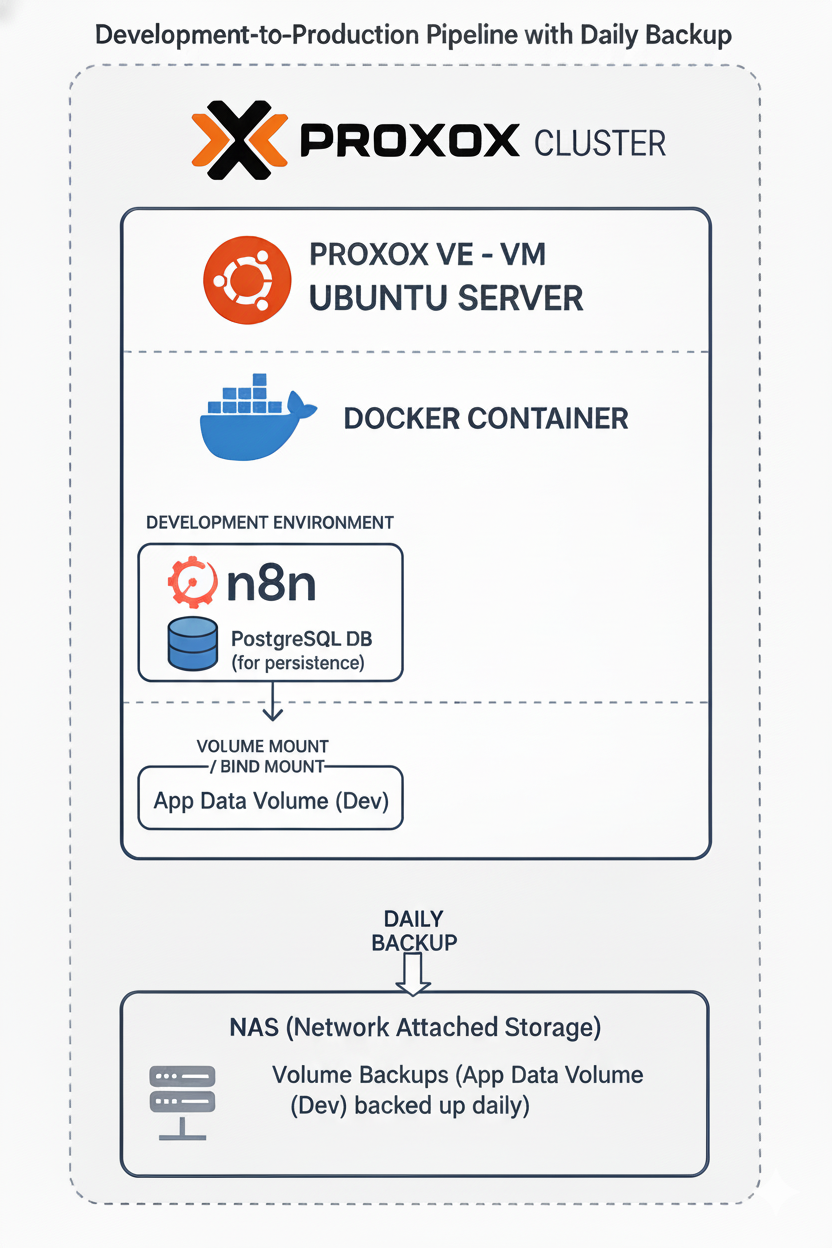
N8N workflow automation dashboard with active workflows
📋 Overview
Built a containerized N8N workflow automation platform for testing and developing automation workflows before production deployment. The setup demonstrates container orchestration, data persistence, and infrastructure management skills.
🎯 Challenge
Needed a reliable development environment for testing workflow automations before deploying to production. Required proper data persistence, security configuration, and easy maintenance while learning container orchestration.
💡 Solution
Implemented a Docker-based N8N instance on Ubuntu Server with persistent data volumes, basic authentication, and proper network configuration. Created a development-to-production pipeline for workflow validation.
🛠️ Technologies
Docker & Docker Compose
Container orchestration with proper volume mounting and environment configuration
N8N Workflow Engine
Open-source automation platform for connecting apps and services
Ubuntu Server
Linux server administration and network configuration
SQLite Database
Persistent data storage for workflows and execution history
✨ Key Features
🐳 **Containerized Deployment**: Docker Compose configuration with proper resource management
💾 **Data Persistence**: Persistent volumes for SQLite database, binary data, and custom nodes
🔐 **Security Configuration**: Basic authentication with environment-based credentials
📊 **Monitoring & Logging**: Application logs and execution tracking
🔄 **Development Pipeline**: Test workflows locally before production deployment
⚙️ **Custom Node Support**: Directory structure for custom automation packages
🗂️ **Git Integration**: Version control for workflow configurations
🏗️ Technical Highlights
Container Architecture
Designed Docker container with proper user mapping (1000:1000), volume persistence, and network isolation
Data Management
Implemented comprehensive data persistence strategy including database, binary files, and configuration backups
Environment Configuration
Secured deployment with environment variables for credentials and configurable webhook tunneling
💻 Implementation
Docker Compose Configuration
services:
  n8n:
    image: docker.n8n.io/n8nio/n8n:latest
    container_name: n8n
    restart: unless-stopped
    ports:
      - "5678:5678"
    env_file:
      - /opt/n8n_data/.env
    volumes:
      - /opt/n8n_data:/home/node/.n8n
    user: "1000:1000"
Environment Configuration
N8N_BASIC_AUTH_USER=admin@example.com
N8N_BASIC_AUTH_PASSWORD=secure_password
N8N_SECURE_COOKIE=false
# Optional webhook tunnel
# WEBHOOK_TUNNEL_URL=https://tunnel.ngrok-free.app
🚀 Deployment Specs
| Server | Ubuntu Server 192.168.1.30 |
| Container | docker.n8n.io/n8nio/n8n:latest |
| Ports | 5678:5678 (proxied via 8090) |
| Data Volume | /opt/n8n_data:/home/node/.n8n |
| Database | SQLite (~1.1GB) |
| Authentication | Basic Auth enabled |
📸 Gallery
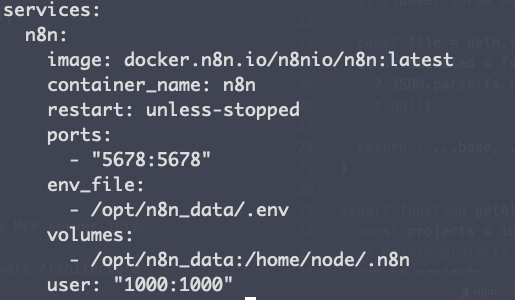
Docker Compose setup with volume mounts and environment configuration
🎓 Key Learnings
- 📚Container orchestration and Docker Compose best practices
- 📚Linux file permissions and user mapping in containers
- 📚Data persistence strategies for stateful applications
- 📚Network configuration and port management
- 📚Infrastructure as Code principles